Table of Contents
Brief Introduction #
Localizing Notifima is easy and straightforward, all you need is a translation file for your language.
You may create translations as has been outlined in the WordPress Codex, but the easiest possible way that we have found out for you is to use the Loco Translate plugin.
How to Translate Notifima Using Loco Translate #
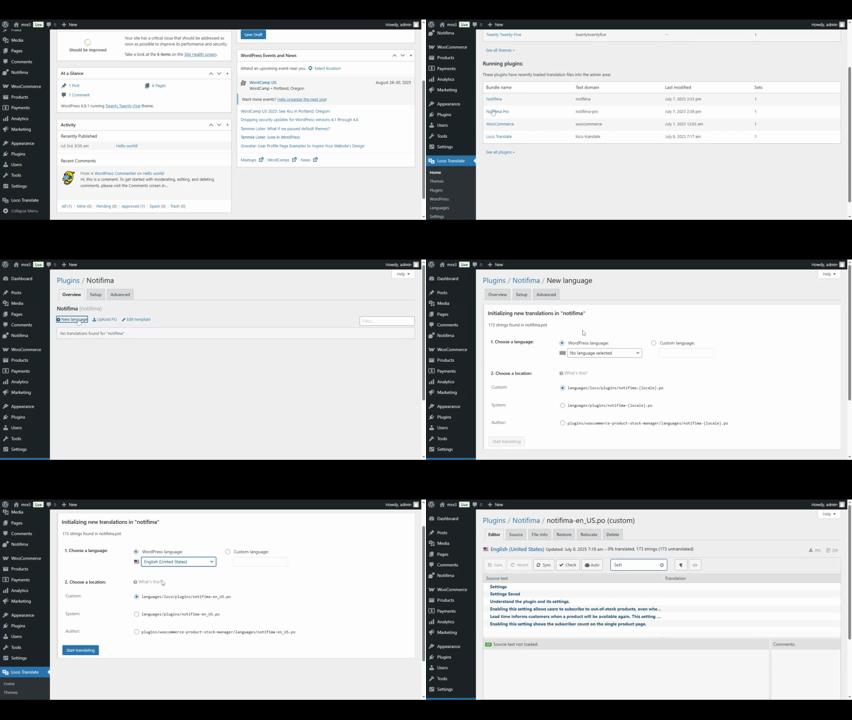
- Download, Install, and Activate Loco Translate. Once activated, a new menu item named Loco Translate will appear with five sub-sections.
- Navigate to the Plugins section and select Notifima.
- Click New Language to add a new translation. If your language is not listed under WordPress Languages, select Custom Language and enter the ISO code.
- Choose a Translation Location:
- Custom – Recommended for preserving your translations.
- Author – Not recommended, as updates will override changes.
- System – Will be overridden by translations from translate.wordpress.org.
- Click Start Translating, select the Source Texts, and enter your translations.
- Finally, click Save to store your translations. Check the screenshot below for further clarification.