Brief Introduction #
Want to keep customers engaged and boost sales? Notifima is here to ensure they never miss out! Automatically notify subscribers when products are back in stock and turn interest into conversions. Install Notifima today and keep your customers coming back!
System Requirements #
The basic system requirements needed to install Notifima is described below –
- PHP : 8.0 or higher
- MySQL : 5.5 or later
- WordPress : 5.4 or higher
- WooCommerce : 8.0 or higher
Installation and Activation #
Now that you have your system requirements ready, let’s get started with the installation process. Installing Notifima is as easy as ABC. Just follow these steps:
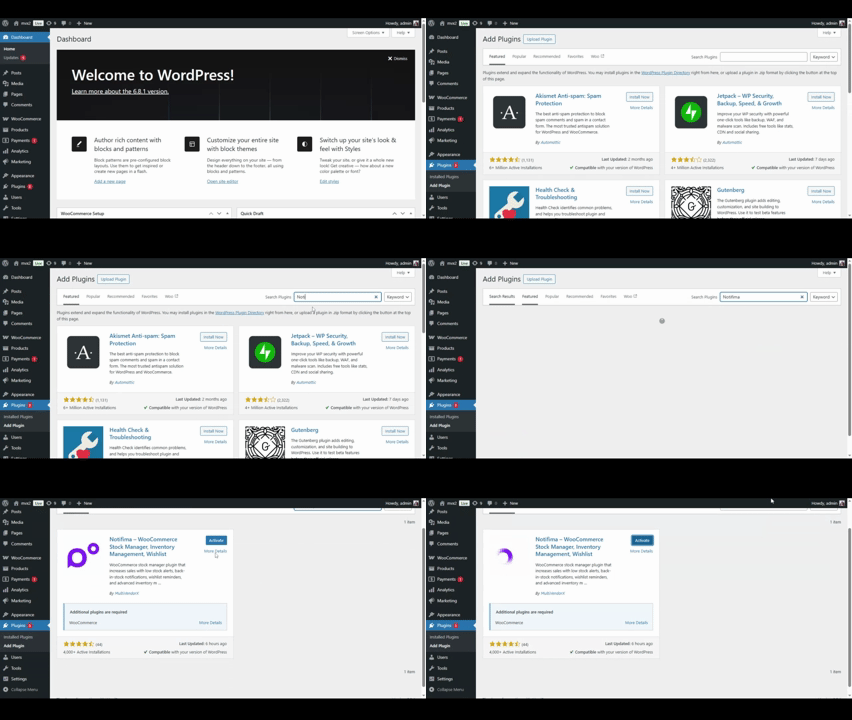
- Go to your Admin Dashboard and navigate to Plugins.
- On the Plugins page, click on Add Plugin.
- Search for Notifima in the Search Plugins section.
- When Notifima appears in the search results, click on the Install Now button next to it.
- After the installation, click on Activate. Notifima is now activated on your website!
Alternatively, you can install our plugin by following these steps:
- Download Notifima from the WordPress.org plugin directory here .
- Go to the Add New section as previously mentioned.
- Click on the Upload Plugin button at the top. Browse to the location of the downloaded file and select the recently downloaded zip file. Then click on Install Now.
Or you can:
- Extract the downloaded zip file to the WordPress plugins folder, which is usually found at: “yourhostname/wordpress/wp-content/plugins”.
- Remember, pushing the extracted file to your plugins folder will not activate the plugin. To activate Notifima, go to the Plugins section in the admin dashboard and click on Activate under Notifima.
Note: Notifima is an extension for WooCommerce. You need to have WooCommerce installed and activated on your WordPress site before using Notifima.
Notifima Pro #
Now we will guide you through upgrading to Notifima PRO with a step-by-step process. Here’s how to install Notifima Pro:
- Purchase a License: First, you need to purchase a license for Notifima Pro.
- Download Notifima Pro: Once purchased, download Notifima Pro from your My Account page.
- Install Notifima Pro:
- Go to your WordPress dashboard > Plugins > Add New.
- Select Upload Plugin from the drop-down menu.
- Click on Choose File and select the zip file you downloaded.
- Press the Install Now button.
- Activate Your License:
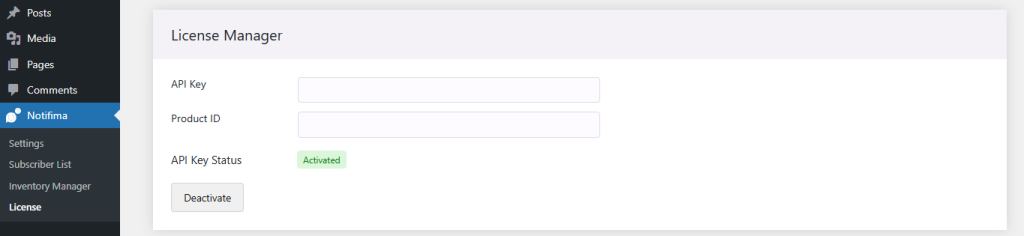
- Navigate to WordPress Dashboard > Notifima > License.
- Paste the API Key and Product ID copied from the License Keys tab on your My Account page.
- Finally, click the Activate button to complete the activation process.